Patient portal for online care practices: Between visits, your app keeps patients on plan.
Your patients are remote, so the app is where your practice lives between visits. ClinicBond is a branded patient app with reminders on each patient's schedule, a weekly streak, check-ins your care team reads and a repeat order in two taps, plus online intake and your team's review before anything ships.
14-day free trial · No card needed

What an online care practice gets
- ✓Patients who stay on planReminders on their own schedule, a weekly streak and progress they can see keep the program in front of them between visits.
- ✓Repeat purchases without a callA reminder about ten days before their supply runs out, then two taps with the card on file.
- ✓A care team that hears about a bad weekCheck-in answers that need attention reach your team by email, and every message lands in one inbox.
What brings a remote patient back
Your day opens on who has gone quiet.
Patients who have gone quiet, each with a Review button, and orders to ship, each with a one-click Mark shipped. On Growth and up the At-risk view adds the reason, by default: nothing logged in two weeks, adherence dropping, supply run out and not continued, or the app not opened in a month. You can change the thresholds.

Nothing ships until your team has looked.
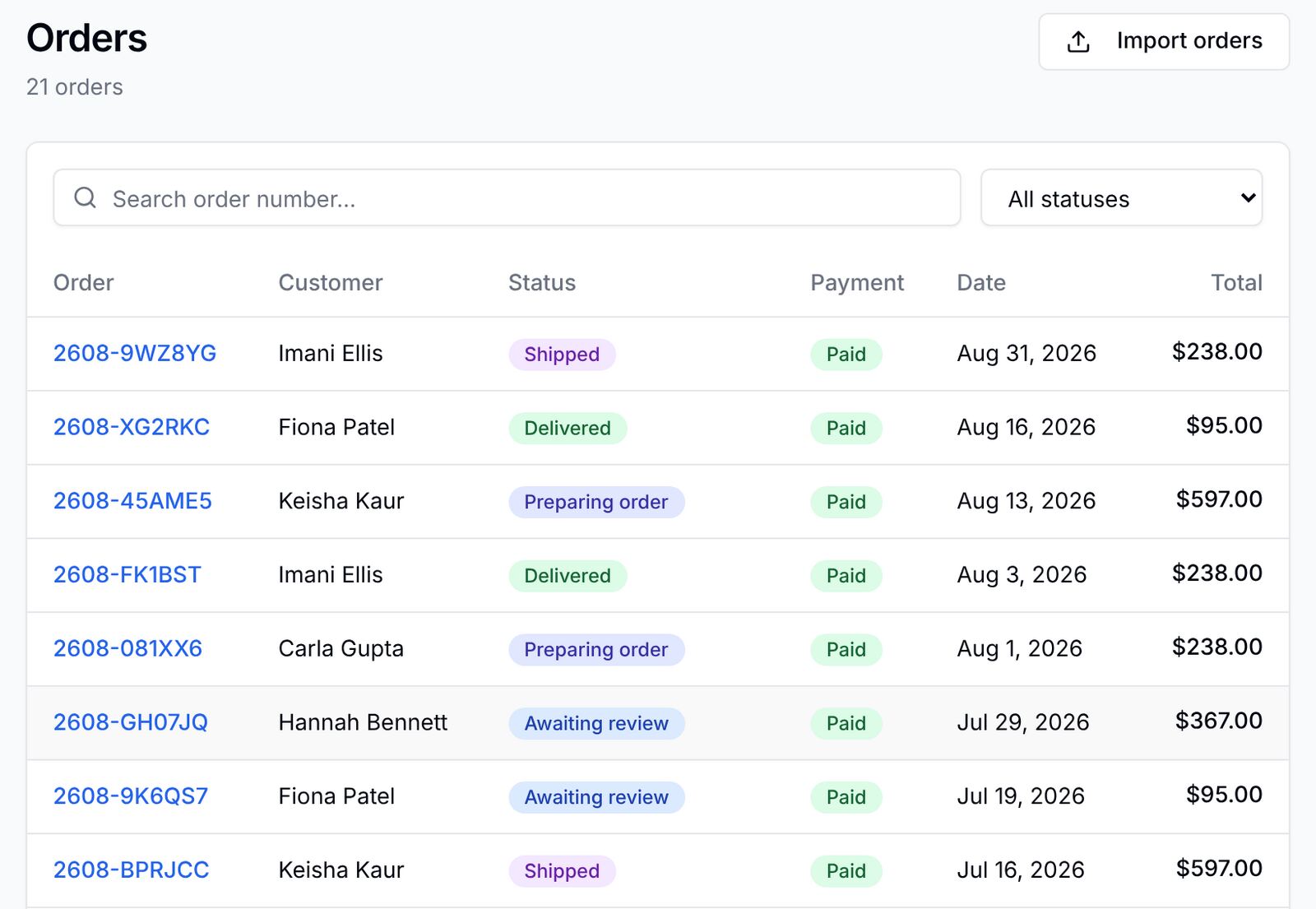
Unless you switch on Auto-approve orders, a paid order waits as Awaiting review until someone on your team approves it, so your provider can check it first. Add tracking and carrier updates move the order to in transit and delivered on their own, and every change is written to the order history with who made it.
Credit for staying, in plain dollars.
Store credit by rules you set: a weekly streak, lifetime spend, a birthday, a friend who places a first order. Patients see the ways to earn in the app, share an invite link, and the credit comes off their next order. On every plan, off until you switch it on.

Reminders on their own schedule
By email: the day before each scheduled treatment day, a nudge the next day if one was missed, and a reminder about ten days before the supply runs out and again when it does. Push as well in your own store app (Signature).
A streak counted in weeks
Each week on plan extends the streak and skips are recorded. Milestones mark the way, and a rewards rule can pay credit when a patient reaches the streak you set.
Progress they can see
Weight against goal with milestones, and progress photos side by side, private to the patient and your care team.
Check-ins that reach your team
Short check-ins on how the week went. Answers that need attention are flagged to your team by email, so nobody waits for the next visit to say something is wrong.
Two taps to continue
The same product and the saved card, straight from the reminder. A patient can also switch on automatic repeat orders, timed to arrive before they run out.
Win-back emails
Signups who never ordered get up to three emails a week apart, each with a one-tap login link and no treatment detail.
Growth and upHow does an online care practice run its program in the portal?
An online care practice has no waiting room a patient walks through. The portal takes its place: it is where a patient signs up, where your team reviews an order, and where the patient checks in, messages you and buys again between visits.
Signup and intake, online
Each program you offer is a category with its own intake questions and results page. A patient picks a goal, answers that path's questions and lands on a results page with the products for it, and the answers are stored on their record for your team. The stock forms and pages are on every plan; building your own is Growth and up.
Your team reviews before anything ships
A paid order arrives as Awaiting review and waits until someone on your team approves it, so your provider can read the intake answers and the patient's history first. A practice that prefers it can switch on Auto-approve orders. Every status change is stamped with who made it.
Shipped home, or seen in person
Each product is shipped or done in person. Shipped products collect an address and show every step in the app, with carrier updates every two hours, so "where is my order?" stops being a message. For a hybrid practice, in-person treatments skip the address and send the patient to your booking calendar after payment.
Between visits
Check-ins, progress photos and messages reach your care team between appointments. Check-in answers that need attention alert your team by email, photos stay blurred in the dashboard until someone chooses Reveal, and the patient is emailed when a reply is waiting.
What it is not
It has no video visits and no scheduler of its own, and it is not an electronic health record. Keep the tools you use for visits and charting; the portal runs alongside them and links to your booking calendar.
How does an online care practice go live?
Programs, Stripe, patients. The getting-started guide has the full checklist.
Create your practice
About a minute for the name, colors and logo. Load the starter catalog as drafts or send us your price list, and choose shipped or in person for each product.
Connect Stripe
Click Connect Stripe under Integrations and enter your business and bank details. Patients pay you directly, and you are the merchant of record.
Invite your patients
Import a spreadsheet and invite by email. Existing patients claim their account from one link; new ones sign up through your intake forms.
Three plans. Every one starts with 14 days free.
Starter
- Branded web portal on your subdomain
- Shop, orders & Stripe payouts
- Progress & weight tracking
- HighLevel sync & workflow triggers (optional)
- Tiered referrals & rewards
- Email check-in reminders
Growth
- Everything in Starter, plus:
- Custom intake forms & results pages
- At-risk patient triage & campaigns
- Custom domain
- Win-back & retargeting emails
- API access
Signature
- Everything in Growth, plus:
- Your own native iOS & Android app
- Push broadcasts to your app's patients
- Published under your developer accounts
- We handle builds, review & updates
- Priority support
Every plan starts with a 14-day free trial and no card. Monthly prices and the platform fee on patient payments are on the pricing page.
What online care practices ask
Does it include video visits?
No. The portal is the patient app and the dashboard behind it: intake, orders, check-ins, progress, messages and reminders under your brand. Run visits in the tool you use today; the portal keeps patients on plan between them.
Can patients sign up and do their intake online?
Yes. Each program has its own intake questions and results page at signup, on every plan, and a program appears at signup only once it has a live product, so no goal leads nowhere. Building your own forms and results pages is Growth and up.
Does an order ship before our team has reviewed it?
Not by default. Paid orders wait as Awaiting review until someone on your team, such as your provider, approves them, unless you switch on Auto-approve orders. The patient is emailed when the order is confirmed, approved, shipped and delivered, and every change is written to the order history with who made it.
How does it keep remote patients from dropping off?
Reminders on each patient's own schedule, a weekly streak, progress and photos they can see, check-ins that reach your team and a two-tap repeat order. On Growth and up, the At-risk view lists who is slipping and why, and signups who never ordered get win-back emails.
Can we see some patients in person too?
Yes. Each product is shipped or done in person. In-person treatments skip the address and send the patient to your booking calendar after payment, in the same app and the same order queue as shipped products.
How is patient data protected?
The portal is built for HIPAA compliance, and the Business Associate Agreement is signed at signup on every plan. It runs on HIPAA-eligible AWS hosting, clinical notes and messages are encrypted with AES-256-GCM, every patient record opened is logged, and owners and admins can turn on two-factor sign-in. The security page lists every control.
What does it cost?
Three plans, each with a 14-day free trial and no card needed to start. The monthly prices and the platform fee on patient payments are on the pricing page.
Keep remote patients on plan.
14-day free trial · No card needed